GuideData Services Manager - DBaaS with Kubernetes
Overview
VMware Data Services Manager - K8s Operator
VMware DSM provisions Data Services like Postgres, MySQL and MSSQL. You can consume DSM in three ways:
- DSM UI
- VCF Automation
- K8s Operator
DSM Installation is straightforward, just grab the OVA and install it. DSM will install a Plugin in vCenter and the DSM UI will be accessible with the IP you configured on the OVA setup. Nothing special needed, no NSX, no vSAN.
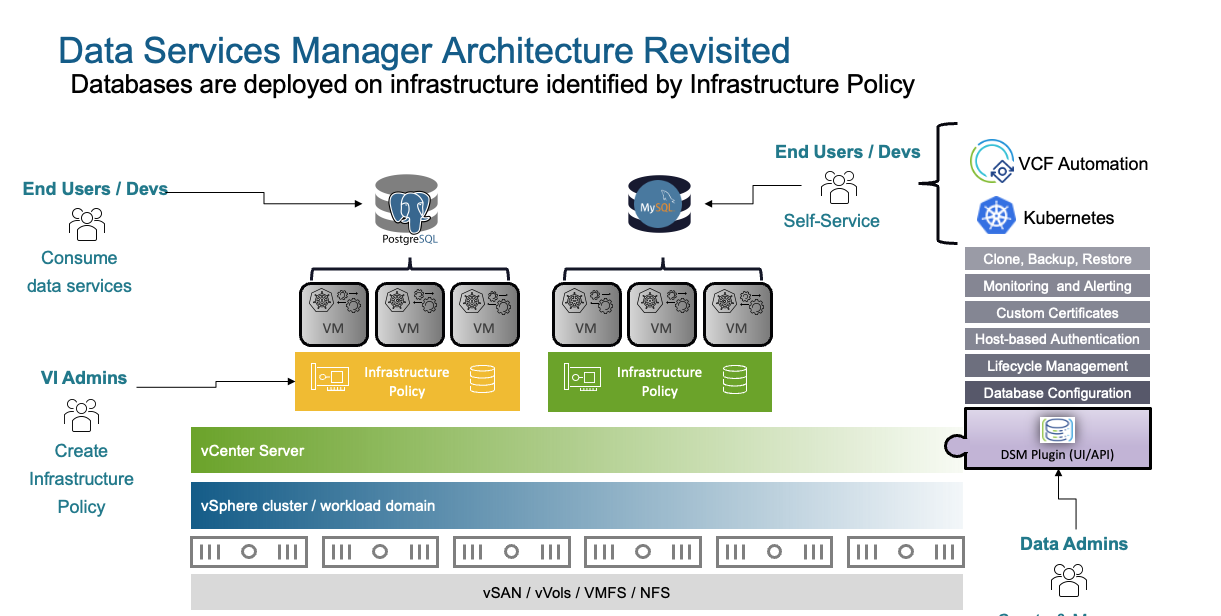
Scenario 1 - Postgres HA Cluster
We have the scenario that we have a Kubernetes cluster and some apps need a PostgreSQL database. In general, it is a good idea to have your persistent data outside of your k8s cluster (S3, external DB, etc.). You could have Postgres running on the same k8s cluster as your other apps, but that will be more of a build-your-own solution which will have its drawbacks.
DSM UI
If you never used DSM the UI will give you a great overview. Lets provision a highly available PostgreSQL Cluster.
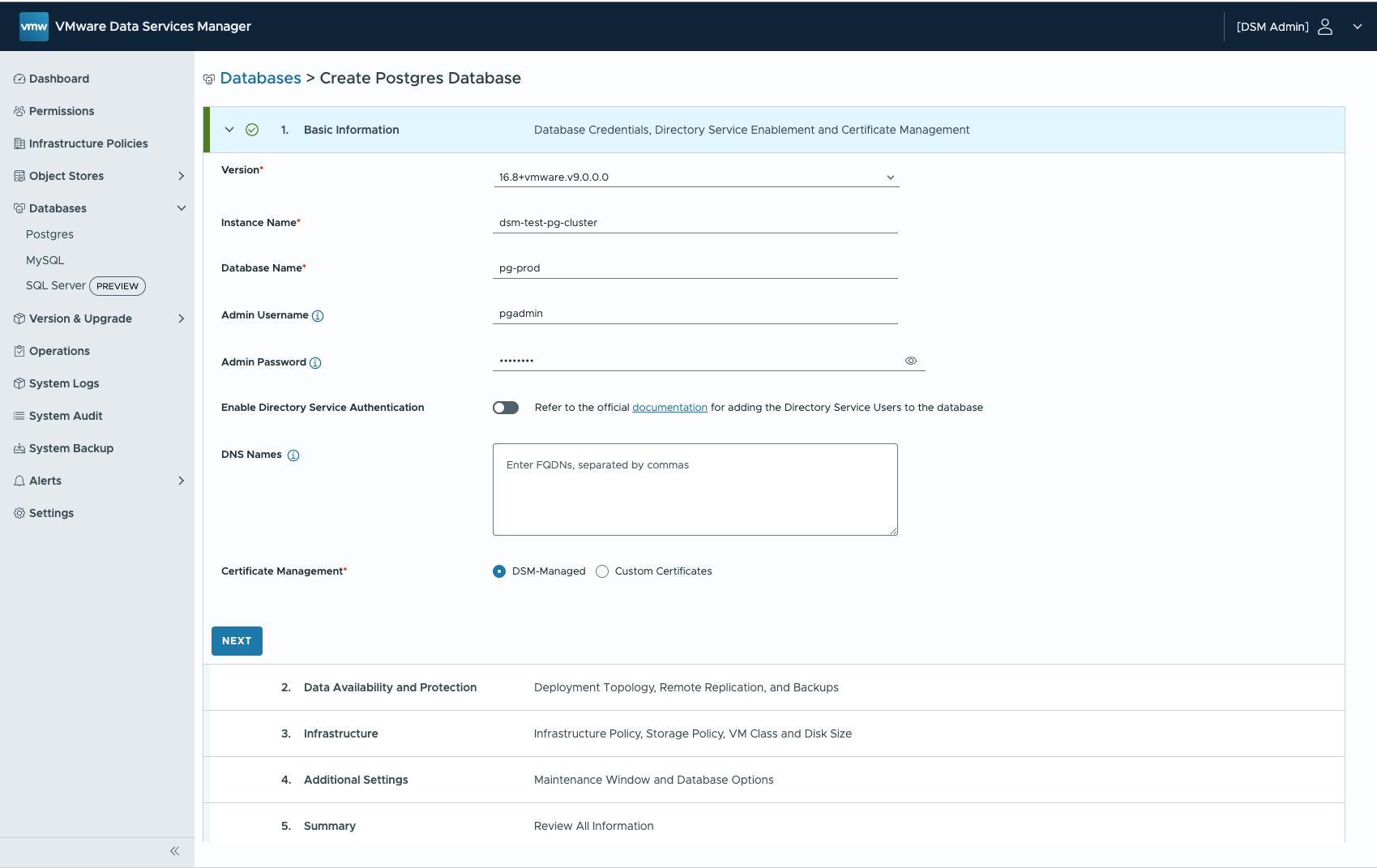
Select the Topology (Cluster = 3 VMs)
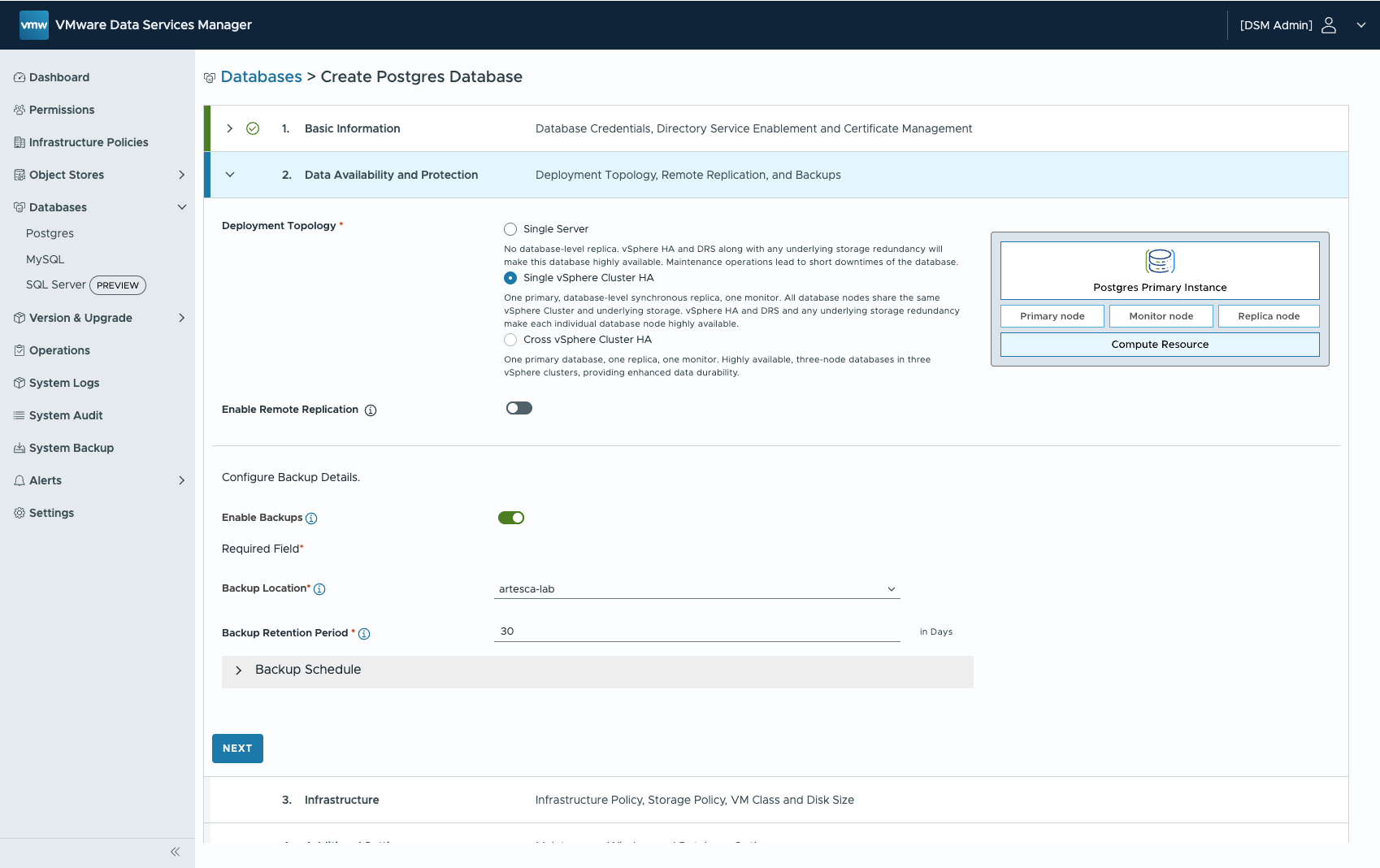
Select the Infrastructure Policy (vSphere Cluster, Portgroup, Storage Policy)
Configure Maintenance Windows and optional pg_hba parameters.
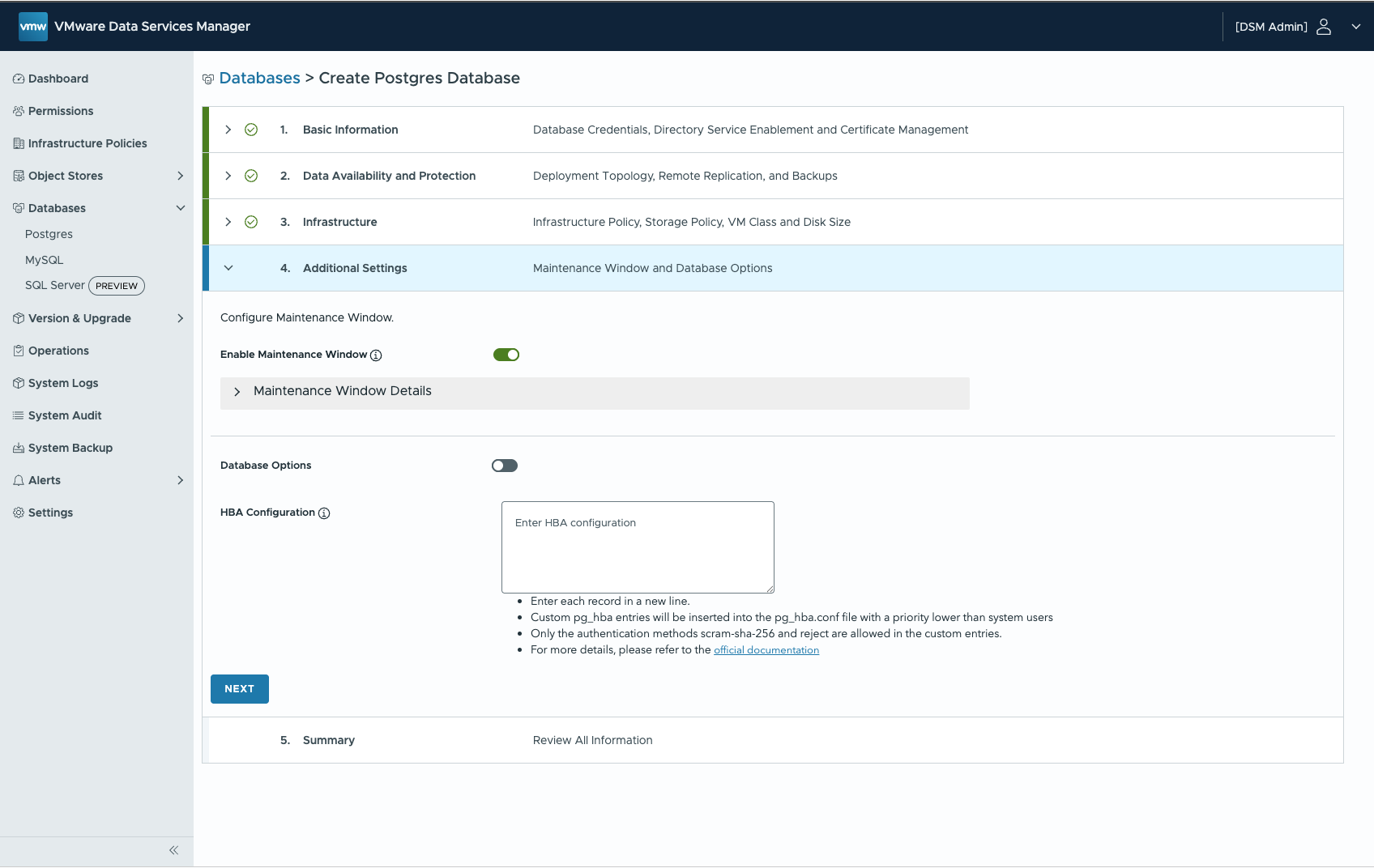
DSM will now provision three VMs via vCenter and set up PostgreSQL within those three VMs (note: it will leverage Kubernetes for that).
DSM K8s Operator
Now we will provision a PostgreSQL Cluster via K8s Operator thats running inside our Kubernetes Cluster.
Install K8s Consumption Operator - DSM 2.x
Login to vSphere Kubernetes Cluster (VKS)
kubectl vsphere login --server=https://172.29.30.2 --insecure-skip-tls-verify --tanzu-kubernetes-cluster-name cl-lab-vbuenzli-kcl-01 --tanzu-kubernetes-cluster-namespace cl-lab-vbuenzli --vsphere-username "[email protected]"
create k8s namespace for dsm operator
kubectl create namespace dsm-consumption-operator-system
We are directly using the default registry, such as Broadcom Artifactory, you don't need authentication. We create a registry secret using the following command, ignoring the username and password values:
kubectl -n dsm-consumption-operator-system create secret docker-registry registry-creds \
  --docker-server=ignore \
  --docker-username=ignore \
  --docker-password=ignore
If you are using your own internal registry, where the consumption operator image exists, you need to provide those credentials here:
  kubectl -n dsm-consumption-operator-system create secret docker-registry registry-creds \
  --docker-server=<DOCKER_REGISTRY> \
  --docker-username=<REGISTRY_USERNAME> \
  --docker-password=<REGISTRY_PASSWORD>
Create an authentication secret that includes all the information needed to connect to the VMware Data Services Manager provider:
kubectl -n dsm-consumption-operator-system create secret generic dsm-auth-creds \
 --from-file=root_ca=dsm-root-ca \
 --from-literal=dsm_user=admin@dsm \
 --from-literal=dsm_password='VMware1!' \
 --from-literal=dsm_endpoint=https://172.29.30.51
Pull the helm chart from registry and unpack it in a directory and deploy to cluster.
Add your Backup Locations and Infrastructure Policies to the values-override.yaml. Infrastructure and Backup Locations can be created and viewed in the DSM UI.
values-override.yaml
imagePullSecret: registry-creds
replicas: 1
image:
  name: projects.packages.broadcom.com/dsm-consumption-operator/consumption-operator
  tag: 2.2.0
dsm:
  authSecretName: dsm-auth-creds

  # allowedInfrastructurePolicies is a mandatory field that needs to be filled with allowed infrastructure policies for the given consumption cluster
  allowedInfrastructurePolicies:
  - labvce3-dsm-ip01

  # allowedBackupLocations is a mandatory field that holds a list of backup locations that can be used by database clusters created in this consumption cluster
  allowedBackupLocations:
  - vsan-datastore
  - artesca-lab

  # list of infraPolicies and backupLocations that need to be applied to all namespaces that match the given selector
  applyToNamespaces:
    selector:
      matchAnnotations: {}
    infrastructurePolicies: []
    backupLocations: []

   # adminNamespace specifies where administrative DSM system objects
   # should be stored in the consumption cluster. When not set, administrative
   # objects will not be available in the consumption cluster
  adminNamespace: "dsm-consumption-operator-system"

  # consumptionClusterName is an optional name that you can provide to identify the Kubernetes cluster where the operator is deployed
  consumptionClusterName: "infra01"

  # psp field allows you to deploy the operator on pod security policies-enabled Kubernetes cluster (ONLY for k8s version < 1.25).
  # Set psp.required to true and provide the ClusterRole corresponding to the restricted policy.
  psp:
    required: false
    role: ""
helm pull oci://projects.packages.broadcom.com/dsm-consumption-operator/dsm-consumption-operator --version 2.2.0 -d consumption/ --untar

helm upgrade --install dsm-consumption-operator consumption/dsm-consumption-operator -f values-override.yaml --namespace dsm-consumption-operator-system
Check Logs:
kubectl logs -n dsm-consumption-operator-system deployments/dsm-consumption-operator-controller-manager -f
Install K8s Consumption Operator - DSM 9.0.1
In DSM 9.0.1, two things have changed regarding the k8s operator. See the Vendor Docs [2]
- For VMware Data Services Manager version 9.0.1 and later, add a dataServicePolicyNamespaceLabels field to the values.yaml file.
- For VMware Data Services Manager version 9.0.1 and later, you create data service policies in the VMware Data Services Manager gateway.
Create PostgreSQL Cluster via K8s Consumption Operator
Create PostgresCluster Manifest:
---
apiVersion: v1
kind: Namespace
metadata:
  name: dev-team
---
apiVersion: infrastructure.dataservices.vmware.com/v1alpha1
kind: InfrastructurePolicyBinding
metadata:
  name: labvce3-dsm-ip01
  namespace: dev-team
---
apiVersion: databases.dataservices.vmware.com/v1alpha1
kind: BackupLocationBinding
metadata:
  name: artesca-lab
  namespace: dev-team
---
apiVersion: databases.dataservices.vmware.com/v1alpha1
kind: PostgresCluster
metadata:
  name: pg-dev-cluster
  namespace: dev-team
spec:
  replicas: 3
  version: "14"
  vmClass:
    name: medium
  storageSpace: 20Gi
  infrastructurePolicy:
    name: labvce3-dsm-ip01
  storagePolicyName: sp-dsm-e3
  backupConfig:
    backupRetentionDays: 91
    schedules:
      - name: full-weekly
        type: full
        schedule: "0 0 * * 0"
      - name: incremental-daily
        type: incremental
        schedule: "30 10 * * *"
  backupLocation:
    name: artesca-lab
Apply it:
kubectl apply -f user-namespace-example.yaml

export K8S_NAMESPACE=dev-team
View available infrastructure policies by running the following command:
kubectl get infrastructurepolicybinding -n $K8S_NAMESPACE
You can also check the status field of each infrapolicybinding to find out the values of vmClass, storagePolicy, and so on.
Check status of ongoing deployment:
kubectl get postgresclusters.databases.dataservices.vmware.com -n $K8S_NAMESPACE pg-dev-cluster -o jsonpath='{.status.conditions}' | jq
Wait for:
    {
      "lastTransitionTime": "2025-06-26T06:24:40Z",
      "message": "",
      "observedGeneration": 1,
      "reason": "ConfigApplied",
      "status": "True",
      "type": "CustomConfigStatus"
    }
Retrieve Connection Information
kubectl get postgresclusters.databases.dataservices.vmware.com -n $K8S_NAMESPACE pg-dev-cluster -o jsonpath='{.status.connection}' | jq
{
  "dbname": "pg-dev-cluster",
  "host": "10.177.150.86",
  "passwordRef": {
    "name": "pg-pg-dev-cluster"
  },
  "port": 5432,
  "username": "pgadmin"
}
Retrieve Connection Vars:
PASSWORD=$(kubectl -n $K8S_NAMESPACE get secrets/$(kubectl get postgresclusters.databases.dataservices.vmware.com -n $K8S_NAMESPACE pg-dev-cluster -o jsonpath='{.status.connection.passwordRef.name}') --template={{.data.password}} | base64 -d)
USER=$(kubectl get postgresclusters.databases.dataservices.vmware.com -n $K8S_NAMESPACE pg-dev-cluster -o jsonpath='{.status.connection.username}')
HOST=$(kubectl get postgresclusters.databases.dataservices.vmware.com -n $K8S_NAMESPACE pg-dev-cluster -o jsonpath='{.status.connection.host}')
DBNAME=$(kubectl get postgresclusters.databases.dataservices.vmware.com -n $K8S_NAMESPACE pg-dev-cluster -o jsonpath='{.status.connection.dbname}')
Connect to the DB:
PGPASSWORD=$PASSWORD psql -h $HOST -U $USER $DBNAME
Test Deployment
Patch existing secret
# Define variables
K8S_NAMESPACE="dev-team"
CLUSTER_NAME="pg-dev-cluster"
SECRET_NAME=$(kubectl get postgresclusters.databases.dataservices.vmware.com -n $K8S_NAMESPACE $CLUSTER_NAME -o jsonpath='{.status.connection.passwordRef.name}') # The secret you want to patch

# Fetch the connection info as a JSON object
CONNECTION_INFO=$(kubectl get postgresclusters.databases.dataservices.vmware.com \
  -n "$K8S_NAMESPACE" "$CLUSTER_NAME" \
  -o jsonpath='{.status.connection}')

# Check if the command succeeded
if [ -z "$CONNECTION_INFO" ]; then
  echo "Error: Could not retrieve connection info for cluster '$CLUSTER_NAME' in namespace '$K8S_NAMESPACE'."
  exit 1
fi

# Extract values using jq
HOST=$(echo "$CONNECTION_INFO" | jq -r '.host')
PORT=$(echo "$CONNECTION_INFO" | jq -r '.port')
DBNAME=$(echo "$CONNECTION_INFO" | jq -r '.dbname')
USERNAME=$(echo "$CONNECTION_INFO" | jq -r '.username')

# Construct the JSON patch payload using stringData
PATCH_PAYLOAD=$(cat <<EOF
{
  "stringData": {
    "host": "$HOST",
    "port": "$PORT",
    "dbname": "$DBNAME",
    "username": "$USERNAME"
  }
}
EOF
)


# Apply the patch to the secret
echo "Patching secret '$SECRET_NAME' in namespace '$K8S_NAMESPACE'..."
kubectl patch secret "$SECRET_NAME" -n "$K8S_NAMESPACE" --type=merge -p "$PATCH_PAYLOAD"


printf "Patch complete. \n Secret: \n $(kubectl get secret "$SECRET_NAME" -n "$K8S_NAMESPACE" -o yaml ) \n"

# create new secret

kubectl create secret generic "pg-demo" --from-literal=host=$HOST --from-literal=port=$PORT --from-literal=dbname=$DBNAME --from-literal=username=$USERNAME -n "$K8S_NAMESPACE"  --from-literal=password=$PASSWORD
Test Application
Retrieve Connection Vars:
export PG_PASSWORD=$(kubectl -n $K8S_NAMESPACE get secrets/$(kubectl get postgresclusters.databases.dataservices.vmware.com -n $K8S_NAMESPACE pg-dev-cluster -o jsonpath='{.status.connection.passwordRef.name}') --template={{.data.password}} | base64 -d)
export PG_USER=$(kubectl get postgresclusters.databases.dataservices.vmware.com -n $K8S_NAMESPACE pg-dev-cluster -o jsonpath='{.status.connection.username}')
export PG_HOST=$(kubectl get postgresclusters.databases.dataservices.vmware.com -n $K8S_NAMESPACE pg-dev-cluster -o jsonpath='{.status.connection.host}')
export PG_DBNAME=$(kubectl get postgresclusters.databases.dataservices.vmware.com -n $K8S_NAMESPACE pg-dev-cluster -o jsonpath='{.status.connection.dbname}')
Label the namespace to allow workload without matching security context:
kubectl label namespace $K8S_NAMESPACE \
  pod-security.kubernetes.io/audit=privileged \
  pod-security.kubernetes.io/warn=privileged \
  pod-security.kubernetes.io/enforce=privileged \
  --overwrite
Test App Manifest (dsm-test-deployment.yaml)
apiVersion: apps/v1
kind: Deployment
metadata:
  name: pgtestapp
spec:
  replicas: 1
  selector:
    matchLabels:
      app: pgtestapp
  template:
    metadata:
      labels:
        app: pgtestapp
    spec:
      imagePullSecrets:
      - name: regcred
      containers:
      - name: pgtestapp
        image: ghcr.io/kastenhq/pgtest:v0.0.1
        imagePullPolicy: Always
        # command:
        #   - "/bin/sh"
        #   - "-c"
        #   - |
        #     echo "PG_HOST: $PG_HOST"
        #     echo "PG_DBNAME: $PG_DBNAME"
        #     echo "PG_USER: $PG_USER"
        #     echo "PG_PASSWORD: $PG_PASSWORD"
        #     tail -f /dev/null
        ports:
        - containerPort: 8080
        env:
          - name: PG_HOST
            valueFrom:
              secretKeyRef:
                name: pg-pg-dev-cluster
                key: host
          - name: PG_DBNAME
            valueFrom:
              secretKeyRef:
                name: pg-pg-dev-cluster
                key: dbname
          - name: PG_USER
            valueFrom:
              secretKeyRef:
                name: pg-pg-dev-cluster
                key: username
          - name: PG_PASSWORD
            valueFrom:
              secretKeyRef:
                name: pg-pg-dev-cluster
                key: password
---
apiVersion: v1
data:
  .dockerconfigjson: eyJhdXRocyI6eyJnaGNyLmlvIjp7InVzZXJuYW1lIjoidHJpYm9jayIsInBhc3N3b3JkIjoiZ2hwX1hpVmYxZFVGYUdCVDRzeHo5NHRUZTVDeGNIRjh5djNMUG5YOSIsImVtYWlsIjoiY2ljZEBzb3VsdGVjLmNoIiwiYXV0aCI6ImRISnBZbTlqYXpwbmFIQmZXR2xXWmpGa1ZVWmhSMEpVTkhONGVqazBkRlJsTlVONFkwaEdPSGwyTTB4UWJsZzUifX19
kind: Secret
metadata:
  creationTimestamp: null
  name: regcred
type: kubernetes.io/dockerconfigjson
---
apiVersion: v1
kind: Service
metadata:
  name: pgtestapp
spec:
  ports:
    - port: 8080
  selector:
    app: pgtestapp
---
apiVersion: apps/v1
kind: Deployment
metadata:
  name: pg-demo
spec:
  replicas: 1
  selector:
    matchLabels:
      app: pg-demo
  template:
    metadata:
      labels:
        app: pg-demo
    spec:
      imagePullSecrets:
      - name: regcred
      containers:
      - name: pgtestapp
        image: ghcr.io/kastenhq/pgtest:v0.0.1
        imagePullPolicy: Always
        # command:
        #   - "/bin/sh"
        #   - "-c"
        #   - |
        #     echo "PG_HOST: $PG_HOST"
        #     echo "PG_DBNAME: $PG_DBNAME"
        #     echo "PG_USER: $PG_USER"
        #     echo "PG_PASSWORD: $PG_PASSWORD"
        #     tail -f /dev/null
        ports:
        - containerPort: 8080
        env:
          - name: PG_HOST
            valueFrom:
              secretKeyRef:
                name: pg-demo
                key: host
          - name: PG_DBNAME
            valueFrom:
              secretKeyRef:
                name: pg-demo
                key: dbname
          - name: PG_USER
            valueFrom:
              secretKeyRef:
                name: pg-demo
                key: username
          - name: PG_PASSWORD
            valueFrom:
              secretKeyRef:
                name: pg-demo
                key: password
Deploy the Application:
kubectl apply -f dsm-test-deployment.yaml -n $K8S_NAMESPACE
Docker Image used for Testing: https://github.com/kastenhq/pgtest
Terraform
If you want to use terraform with DSM have a look at:
- https://blogs.vmware.com/cloud-foundation/2025/05/13/database-as-code-with-data-services-manager-and-terraform/
- https://github.com/xfirestyle2k/VCF-Data-Services-Terraform
You can use the kubernetes terraform provider with DSM!
Summary
Now we have successfully deployed a PostgreSQL Cluster with the DSM K8s Operator (from our Kubernetes Guest Cluster) and deployed a sample application that used the dsm-provisioned database.
In the next blog we are going to have a look at the third option on how to consume db's via DSM, VCF Automation (VCFA)
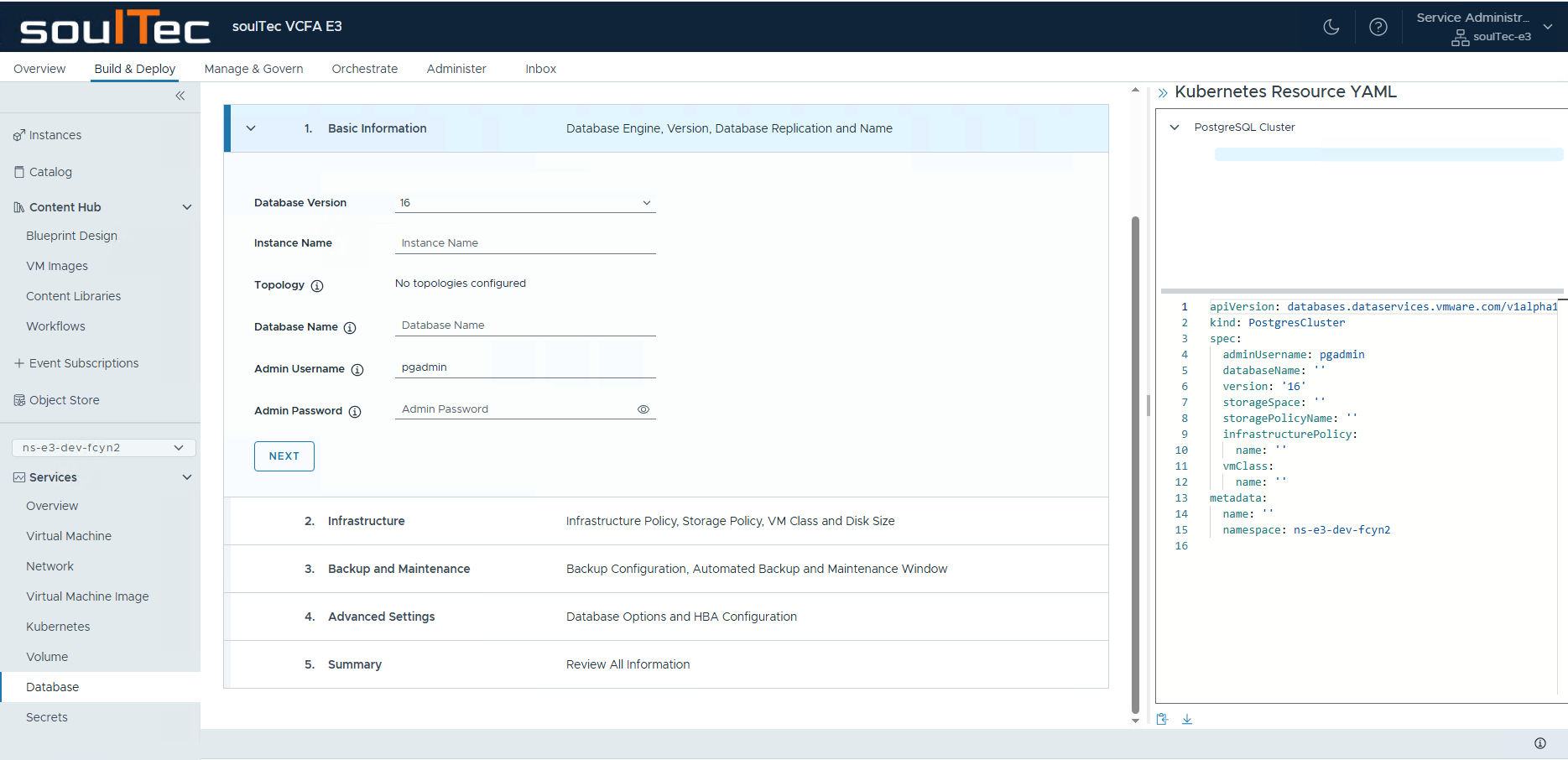
Resources
[1] DSM Intro - VMware Blog from my friend Thomas